
iOS App lifecycle & State Machines
In this article I try to understand the behaviour and system behind the iOS App lifecycle. I’ll draw a parallel between the iOS App Lifecycle and state machines.
AppDelegate and ScenePhase
Before we start, I’d like to mention two important concepts: AppDelegate and ScenePhase.
The iOS operating system needs to communicate with our application to signal lifecycle changes. In UIKit-based apps, this is handled by the AppDelegate class, which provides callback functions for each lifecycle state transition. In SwiftUI-based apps, the same concept is represented by ScenePhase, which lets us react to these changes in a more declarative way.
Both serve the same purpose — they are the bridge between the OS and our app.
Lifecycle elements
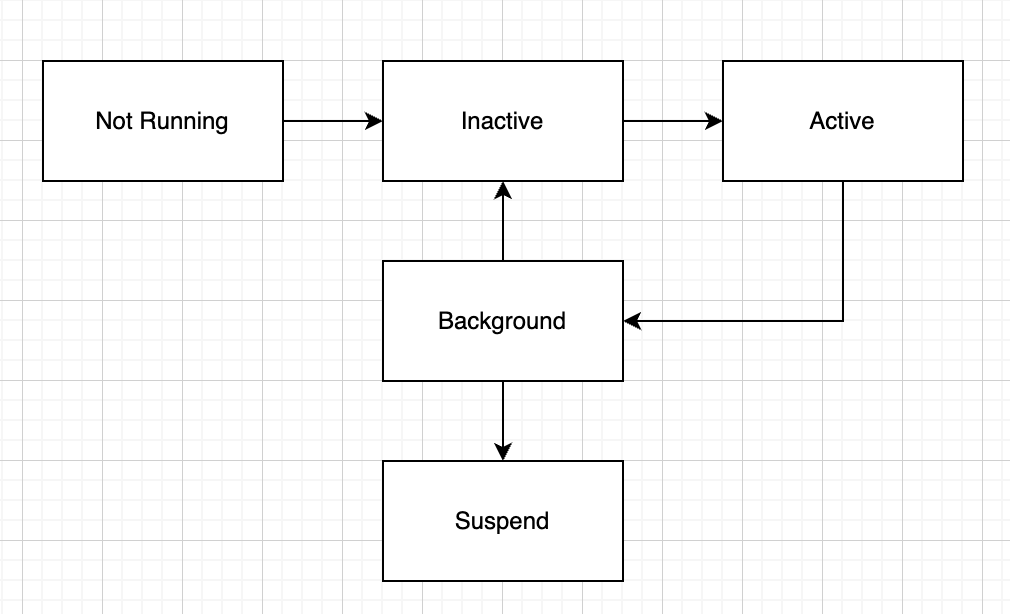
The lifecycle elements are states, and the system can take these states:
- Not Running
- Inactive
- Active
- Background
- Suspend
AppDelegate methods connected to the lifecycle
Let’s look at the lifecycle changes and their corresponding functions together:
| Lifecycle change | Function |
|---|---|
| Not Running → Inactive | application(_:didFinishLaunchingWithOptions:) |
| Inactive → Active | sceneDidBecomeActive(_:) |
| Active → Inactive | sceneWillResignActive(_:) |
| Background → Active | sceneWillEnterForeground(_:) |
| Inactive → Background | sceneDidEnterBackground(_:) |
You can see that we have functions for each lifecycle change. We can look at this as a state machine, where the lifecycle states are handled by transition functions. When the OS changes the state of the application, it notifies our app through these delegate callbacks, giving us the opportunity to run our code during the transition.
A simple example of how it could work
import Foundation

// MARK: - States
enum AppState {
    case notRunning
    case inactive
    case active
    case background
}

// MARK: - AppDelegate
// Listens to lifecycle callbacks and reacts to them.
// In a real app this is where you save data, stop timers, etc.

class AppDelegate {

    func sceneDidBecomeActive() {
        print("   [AppDelegate] sceneDidBecomeActive → resuming game timer")
    }

    func sceneWillResignActive() {
        print("   [AppDelegate] sceneWillResignActive → pausing game timer")
    }

    func sceneDidEnterBackground() {
        print("   [AppDelegate] sceneDidEnterBackground → saving game state to disk")
    }
}

// MARK: - State Machine
// Manages the current state and calls the appropriate delegate callback
// during each transition.

class AppLifecycleStateMachine {

    var currentState: AppState = .notRunning
    let delegate = AppDelegate()

    func transition(from: AppState, to: AppState) {
        print("OS triggers transition: \(from) → \(to)")

        // During the transition the state machine calls the delegate callback
        switch (from, to) {
        case (.inactive, .active):
            delegate.sceneDidBecomeActive()
        case (.active, .inactive):
            delegate.sceneWillResignActive()
        case (.inactive, .background):
            delegate.sceneDidEnterBackground()
        default:
            print("   [StateMachine] no delegate callback for this transition")
        }

        // Transition complete, update the state
        currentState = to
        print("State is now: \(currentState)\n")
    }
}

// MARK: - OS Simulation
// The OS decides when to move the app between states.
// The app has no control over this — it can only react via the delegate.

let os = AppLifecycleStateMachine()

print("--- User opens the app ---\n")
os.transition(from: .notRunning, to: .inactive)
os.transition(from: .inactive, to: .active)

print("--- Incoming phone call ---\n")
os.transition(from: .active, to: .inactive)

print("--- User sends app to background ---\n")
os.transition(from: .inactive, to: .background)
Output
--- User opens the app ---

OS triggers transition: notRunning → inactive
   [StateMachine] no delegate callback for this transition
State is now: inactive

OS triggers transition: inactive → active
   [AppDelegate] sceneDidBecomeActive → resuming game timer
State is now: active

--- Incoming phone call ---

OS triggers transition: active → inactive
   [AppDelegate] sceneWillResignActive → pausing game timer
State is now: inactive

--- User sends app to background ---

OS triggers transition: inactive → background
   [AppDelegate] sceneDidEnterBackground → saving game state to disk
State is now: background
So you can see that the system can call a transition function:
func transition(from: AppState, to: AppState)
…and the transition can handle the state change:
case (.inactive, .active):
    delegate.sceneDidBecomeActive()
…which you can then react to in your app:
class AppDelegate {

    func sceneDidBecomeActive() {
        print("   [AppDelegate] sceneDidBecomeActive → resuming game timer")
    }
}
Understanding the iOS lifecycle as a state machine helps you reason about your app’s behaviour more clearly. When you know which state your app is in and what triggers each transition, you can better predict when and why certain delegate callbacks are called — instead of just memorising them. This mental model makes debugging lifecycle-related issues much easier.